项目地址:https://github.com/zoyassisoe/fastapi-blog # 统一 - 若请求api成功则状态码(status)统一为200。 - 若请求api逻辑成功(例如请求login,且登录成功),在response data信息中code码为200或2000+x(x=1,2,3...)。 - 若请求api逻辑失败(例如请求login,且登录失败),在response data信息中code则有相应的错误码对应,且携带message进行说明。
User
关于user的接口都在/u下面,例如https://localhost/api/u/login ##
u/login POST request 1
2
3
4
5
6
7
8数据类型: json
必选字段:email,password
可选字段:无
eg.
{
"email":"3354007602@qq.com",
"password":"123"
}
1
2
3
4
5
6
7
8
9
10
11
12
13
14{
"code": 2001,
"message": "login success!",
"user": {
"email": "3354007602@qq.com",
"name": "cheng"
},
"token": "eyJhbGciOiJIUzI1NiIsInR5cCI6IkpXVCJ9.eyJlbWFpbCI6IjMzNTQwMDc2MDJAcXEuY29tIiwibmFtZSI6ImNoZW5nIiwiZXhwIjoxNjc5Mjc5ODUwfQ.V5P7YtQZEiuM6Bc3qiW6PgMeA3c9zwu7j9eBiF4iROk"
}
or
{
"code": 4001,
"message": "login filed!"
}1
2
3
4
5
6
7数据类型: json
必选字段:email
可选字段:无
eg.
{
"email":"2066820263@qq.com"
}1
2
3
4{
"code": 200,
"message": "resp success!"
}1
2
3
4数据类型: json
必选字段:email: EmailStr; code: str; pasword: str; name: str
这里的code是验证码,即请求u/send_email_code收到的验证码
可选字段:无
Article
关于article的接口都在/a下面,例如https://localhost/api/a/all ## a/all
GET 获取全部文章及其详细信息
eg. response:
字段名称直接翻译即知道其意。其中body是文章内容是markdown格式
1
2
3
4
5
6
7
8
9
10
11
12
13
14
15
16
17
18
19
20
21
22
23
24
25
26
27
28
29
30
31
32
33
34
35
36
37
38
39
40
41
42{
"code": 200,
"message": "resp success!",
"articles": [
{
"title": "test",
"body": "test",
"path": null,
"create_time": "2023-03-20T08:12:13",
"last_update_time": "2023-03-20T08:12:13",
"first_author": "cheng",
"other_author": [],
"tag": []
},
{
"title": "test markdown",
"body": "#123",
"path": null,
"create_time": "2023-03-20T09:37:05",
"last_update_time": "2023-03-20T09:37:05",
"first_author": "cheng",
"other_author": [],
"tag": [
"markdown",
"test"
]
},
{
"title": "test3",
"body": "test",
"path": null,
"create_time": "2023-03-20T08:27:26",
"last_update_time": "2023-03-20T08:27:26",
"first_author": "cheng",
"other_author": [],
"tag": [
"test",
"python"
]
}
]
}
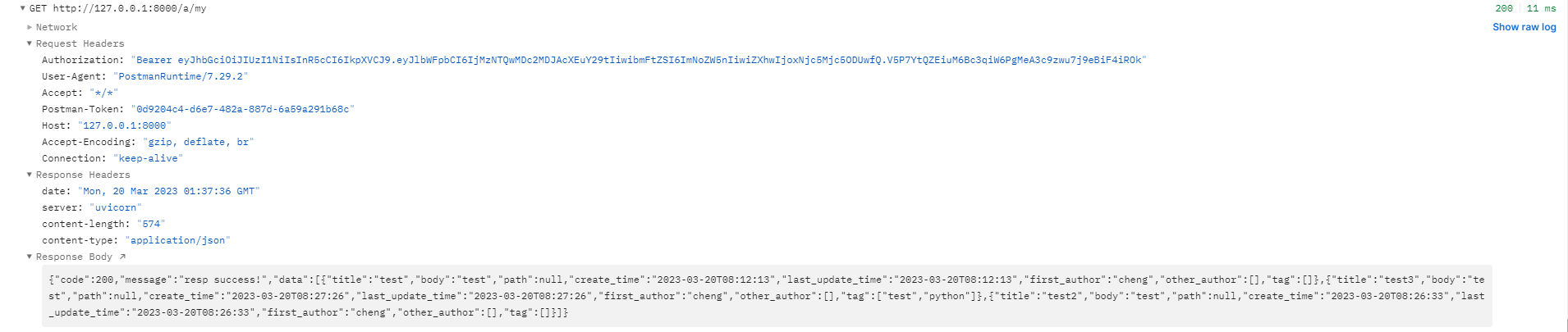
a/my GET
和a/all类似,只是只查找属于对应token的用户的文章
a/create POST
创建新文章 request 1
2
3
4
5
6
7
8
9
10
11
12
13
14
15数据类型: json
必选字段:
body: str
title: str
tag: List[tag_name: str]
other_author: List[user_name: str]
other_author对应的是已注册用户,且不包含当前token对应的用户
可选字段:无
eg.
{
"title":"test markdown",
"body":"#test",
"tag":["test", "markdown"],
"other_author":[]
}1
2
3
4
5
6
7success:
{
    "code": 200,
    "message": "resp success!"
}
unsuccessful:
则对应相应错误码且携带错误信息